> ## Documentation Index
> Fetch the complete documentation index at: https://cj-teaches.dev/llms.txt
> Use this file to discover all available pages before exploring further.
# Fact-check tutorials with versioned docs
> Use Grounded Docs to index versioned documentation, fact-check your tutorials with Claude, and catch deprecated code using verbatim quotes and source URLs.
AI can review your code, documents, and tutorials for inaccuracies.
However, you don't know what source your AI is using when reviewing your content. If it's pulling from old documentation, it could
approve patterns that have since been deprecated, or miss new ones that should be flagged.
In this tutorial, you learn how to provide your AI with versioned documentation to fact-check your content. You use Grounded Docs, a local documentation indexer, to index two versions
of React's docs, configure Claude to back each finding with a verbatim quote and source URL, then use those findings to update deprecated code.
## Prerequisites
Grounded Docs must be installed and the Claude skills must be in place.
## The problem with generic AI review
When you ask an AI to review your content, it pulls information from its training data and memory.
You have little visibility into the source, so you can't be sure it's using accurate or up-to-date information.
For example, you could ask Claude:
```plaintext theme={null}
Hey Claude, review my React tutorial for accuracy.
```
And Claude confidently replies:
```plaintext theme={null}
Looks good! The forwardRef pattern is correct — wrapping your component
lets the parent access the child's DOM node. The useRef(null)
initialization is right, and the overall approach follows React best
practices. ✓
```
How can you be sure that Claude is using the correct version of the React docs? What if it's pulling from an older version
of React that you aren't using? What if it's using outdated information from its training data? You have no way to verify the source, so you can't trust the review.
When you provide versioned documentation to your AI, it can fact-check content against specific versions, ensuring accuracy and relevance.
## Set up the tutorial file
In your terminal, create a directory for this tutorial and download the React 18 demo tutorial file:
```bash theme={null}
mkdir -p versioned-docs-tutorial
cd versioned-docs-tutorial
curl -O https://raw.githubusercontent.com/cjobermaier/public-resources/main/increase-content-accuracy/react-18-forwardref-tutorial.md
```
Start Claude Code from inside `versioned-docs-tutorial/`:
```bash theme={null}
claude
```
Later commands reference `react-18-forwardref-tutorial.md` as a relative path, so Claude must be running from this directory.
In the Claude Code terminal, initialize Claude so it's aware of the tutorial file:
```plaintext theme={null}
/init
```
## Indexing versioned documentation with Grounded Docs
Grounded Docs is a local documentation indexer. It indexes documentation on your machine,
and makes it searchable. So instead of pulling from training data or the live web,
Claude queries your local index and you control exactly which version it references.
The `/docs-manage` skill can index documentation. Use the `/docs-manage` skill to index the React 18.3.1 and React 19.2.0 documentation from react.dev.
Index both React 18.3.1 and React 19.2.0 so you can fact-check against either version. These are the latest patches of React 18 and React 19 at the time of writing — swap in whichever versions your project targets.
Run the following command to have Claude index two versions of the React documentation:
```plaintext theme={null}
/docs-manage Index the following two versions of the React documentation:
- https://18.react.dev/reference/react --version 18.3.1
- https://react.dev/reference/react --version 19.2.0
```
Claude crawls both sites and stores the content locally. Allow each permission prompt as it runs.
If you deny one by mistake, re-run the `/docs-manage` skill.
Indexing time varies depending on the size of the documentation and your hardware.
Confirm both versions are ready:
```plaintext theme={null}
Use the /docs-search skill to list the React documentation versions.
```
The table shows React docs versions 19.2.0 and 18.3.1:
| Version | Source | Pages | Status |
| ------- | ---------------------------- | ------------------ | ----------- |
| 19.2.0 | react.dev/reference/react | 49 pages, 422 docs | ✅ completed |
| 18.3.1 | 18.react.dev/reference/react | 45 pages, 307 docs | ✅ completed |
## Fact-check the tutorial
Claude uses the `/docs-search` skill to search the indexed docs for supporting or contradicting text and reports each finding with a verbatim quote
and source URL. Your exact quotes and verdicts may differ between runs, so you should focus on the structure and the overall conclusions,
not exact wording.
You fact check the entire file in this tutorial. You can be granular and fact-check individual claims or sections by including specific keywords in your search query.
For example, you could search for "forwardRef accepts a render function with two arguments: props and ref" to fact-check just that claim.
Run the `/docs-search` skill to fact-check the tutorial against the React 18.3.1 docs:
```plaintext theme={null}
Use the /docs-search skill to fact-check
react-18-forwardref-tutorial.md
against the react 18.3.1 documentation.
```
Claude returns multiple findings with citations from the React 18.3.1 docs. The `forwardRef` pattern is valid in React 18, so it passes:
```plaintext theme={null}
Doc path (local): /reference/react/forwardRef
Public URL: https://18.react.dev/reference/react/forwardRef
Quote: "forwardRef lets your component expose a DOM node
to the parent component with a ref."
Finding: [DOCS SAY] forwardRef correctly exposes a child's
DOM node to a parent. ✅ Accurate
```
A summary of all the findings looks similar to the following:
| Claim | React 18.3.1 |
| ------------------------------------------------------------- | ------------------------------------------------------------------------------ |
| Refs only work on built-in DOM elements by default | ⚠️ Slightly imprecise — the docs say DOM nodes are private, not that refs fail |
| React won't forward a ref to a custom component automatically | ✅ Confirmed |
| forwardRef exposes the DOM node to the parent | ✅ Confirmed |
| Render function takes props and ref | ✅ Confirmed |
| Attach the ref arg to the DOM element you want to expose | ✅ Confirmed |
| useRef(null) starts as null until mount | ✅ Confirmed |
Run the same check against the newer React 19 docs:
```plaintext theme={null}
Use the /docs-search skill to fact-check
react-18-forwardref-tutorial.md
against the react 19.2.0 documentation.
```
This time, Claude flags a deprecation in the `forwardRef` pattern.
Notice the Public URL
and Doc path point to the location in the React 19.2.0 docs where the deprecation is mentioned. You can
click the URL and manually fact-check to confirm the finding:
```plaintext theme={null}
Doc path (local): /reference/react/forwardRef
Public URL: https://react.dev/reference/react/forwardRef
Quote: "In React 19, forwardRef is no longer necessary.
Pass ref as a prop instead. forwardRef will be
deprecated in a future release."
Finding: [DOCS SAY] forwardRef is deprecated in React 19.
The tutorial teaches it as the required pattern,
but the 19.2.0 docs explicitly say it is no
longer necessary. ⚠️
```
Claude identifies that the tutorial is outdated for React 19. The `forwardRef` pattern is now deprecated,
and you need to update the tutorial.
A full summary of all the findings will look similar to the following:
| Claim | vs React 18.3.1 | vs React 19.2.0 |
| ----------------------------------------------- | --------------- | ------------------------------------------ |
| Refs don't auto-forward to custom components | ⚠️ Imprecise | ⚠️ Still true, but fix has changed |
| Use forwardRef to expose a DOM node | ✅ Correct | ⚠️ Deprecated — use ref as a prop instead |
| forwardRef takes a render fn with props and ref | ✅ Correct | ⚠️ Accurate but describes deprecated API |
| Attach the received ref to the DOM node | ✅ Correct | ⚠️ Concept correct, mechanism changed |
| useRef(null) starts as null until mount | ✅ Correct | ✅ Correct |
## Fix the deprecated code
Ask Claude to update the file using the React 19 docs as the authoritative source:
```plaintext theme={null}
Update the tutorial to fix the deprecated `forwardRef` usage,
using the React 19.2.0 docs.
```
Claude shows you the code it wants to update. You can review the change and accept it.
Click on the image to see a larger version of the code diff.
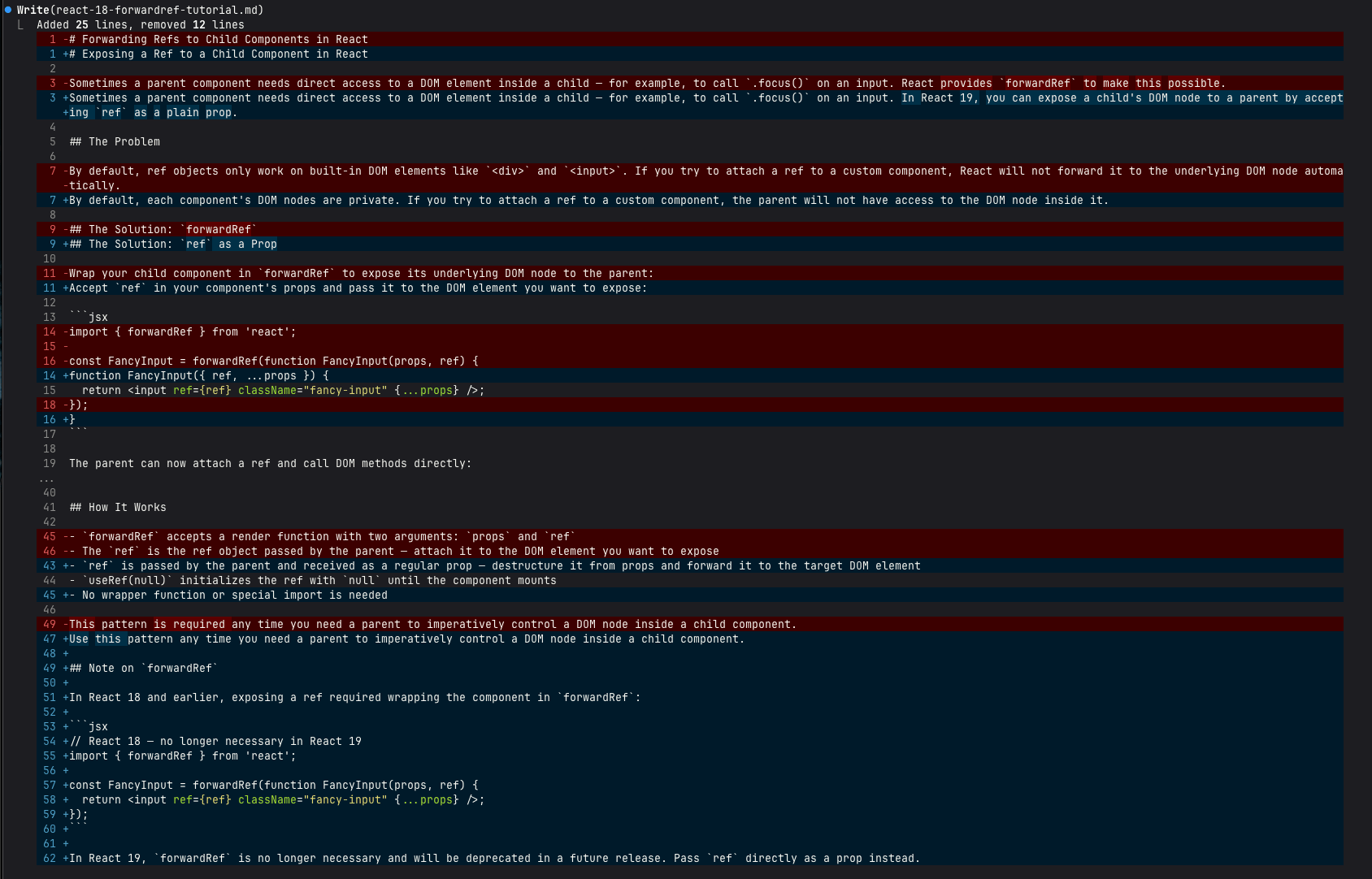 Claude updates the code and gives you a summary of all the changes it made:
| Location | Before | After |
| -------------------- | ------------------------------------------------------------------------ | ------------------------------------------------------------------------------------- |
| Title | "Forwarding Refs to Child Components in React" | "Passing Refs to Child Components in React" |
| Intro | "React provides forwardRef to make this possible" | "you can do this by accepting ref as a regular prop" |
| Problem framing | "ref objects only work on built-in DOM elements" | "components don't expose their DOM nodes to parent components" (matches docs exactly) |
| Solution heading | `## The Solution: forwardRef` | `## The Solution: Accept ref as a prop` |
| FancyInput component | `forwardRef(function FancyInput(props, ref) { ... })` | `function FancyInput({ ref, ...props }) { ... }` |
| import statement | `import { forwardRef } from 'react'` | removed — no longer needed |
| How It Works bullets | "forwardRef accepts a render function with two arguments: props and ref" | "ref is a built-in prop in React 19 — no wrapper or special API needed" |
Re-run the fact-check against React 19.2.0 to confirm the deprecation warning is gone:
```plaintext theme={null}
Use the /docs-search skill to fact-check
react-18-forwardref-tutorial.md for the deprecated `forwardRef` you just fixed,
against the react 19.2.0 documentation.
```
Claude shows the `forwardRef` claim with a new citation from the React 19.2.0 docs that confirms the fix:
```plaintext theme={null}
Doc path (local): /reference/react/forwardRef.md
Public URL: https://react.dev/reference/react/forwardRef.md
Quote: "In React 19, `forwardRef` is no longer necessary. Pass
`ref` as a prop instead."
Finding: [DOCS SAY] ref as a plain prop is the correct React 19
approach. ✅ Accurate
```
Claude gives a summary of all the findings again, and the forwardRef deprecation no longer appears:
| Claim | vs React 19.2.0 |
| ----------------------------------------------------------- | --------------- |
| Components don't expose DOM nodes to parents by default | ✅ |
| Attaching a ref to a custom component won't auto-forward it | ✅ |
| Add ref to props and pass it to the DOM node | ✅ |
| `function FancyInput({ ref, ...props })` code example | ✅ |
| ref is a built-in prop in React 19, no wrapper needed | ✅ |
| useRef(null) starts as null until mount | ✅ |
You used Grounded Docs to index versioned documentation and configured Claude to back each finding with a verbatim quote and source URL. Now your AI reviews cite their sources — and you can trust what they say.
Next, try indexing your own framework or library docs and fact-checking one of your own tutorials.
***
Found an issue with this tutorial? [Open a GitHub issue](https://github.com/cjobermaier/ai-docs-and-tutorials/issues).
Claude updates the code and gives you a summary of all the changes it made:
| Location | Before | After |
| -------------------- | ------------------------------------------------------------------------ | ------------------------------------------------------------------------------------- |
| Title | "Forwarding Refs to Child Components in React" | "Passing Refs to Child Components in React" |
| Intro | "React provides forwardRef to make this possible" | "you can do this by accepting ref as a regular prop" |
| Problem framing | "ref objects only work on built-in DOM elements" | "components don't expose their DOM nodes to parent components" (matches docs exactly) |
| Solution heading | `## The Solution: forwardRef` | `## The Solution: Accept ref as a prop` |
| FancyInput component | `forwardRef(function FancyInput(props, ref) { ... })` | `function FancyInput({ ref, ...props }) { ... }` |
| import statement | `import { forwardRef } from 'react'` | removed — no longer needed |
| How It Works bullets | "forwardRef accepts a render function with two arguments: props and ref" | "ref is a built-in prop in React 19 — no wrapper or special API needed" |
Re-run the fact-check against React 19.2.0 to confirm the deprecation warning is gone:
```plaintext theme={null}
Use the /docs-search skill to fact-check
react-18-forwardref-tutorial.md for the deprecated `forwardRef` you just fixed,
against the react 19.2.0 documentation.
```
Claude shows the `forwardRef` claim with a new citation from the React 19.2.0 docs that confirms the fix:
```plaintext theme={null}
Doc path (local): /reference/react/forwardRef.md
Public URL: https://react.dev/reference/react/forwardRef.md
Quote: "In React 19, `forwardRef` is no longer necessary. Pass
`ref` as a prop instead."
Finding: [DOCS SAY] ref as a plain prop is the correct React 19
approach. ✅ Accurate
```
Claude gives a summary of all the findings again, and the forwardRef deprecation no longer appears:
| Claim | vs React 19.2.0 |
| ----------------------------------------------------------- | --------------- |
| Components don't expose DOM nodes to parents by default | ✅ |
| Attaching a ref to a custom component won't auto-forward it | ✅ |
| Add ref to props and pass it to the DOM node | ✅ |
| `function FancyInput({ ref, ...props })` code example | ✅ |
| ref is a built-in prop in React 19, no wrapper needed | ✅ |
| useRef(null) starts as null until mount | ✅ |
You used Grounded Docs to index versioned documentation and configured Claude to back each finding with a verbatim quote and source URL. Now your AI reviews cite their sources — and you can trust what they say.
Next, try indexing your own framework or library docs and fact-checking one of your own tutorials.
***
Found an issue with this tutorial? [Open a GitHub issue](https://github.com/cjobermaier/ai-docs-and-tutorials/issues).