Prerequisites
Set up Grounded Docs
Grounded Docs must be installed and the Claude skills must be in place.
The problem with generic AI review
When you ask an AI to review your content, it pulls information from its training data and memory. You have little visibility into the source, so you can’t be sure it’s using accurate or up-to-date information. For example, you could ask Claude:Set up the tutorial file
1
Create a working directory
In your terminal, create a directory for this tutorial and download the React 18 demo tutorial file:
2
Launch Claude Code from this directory
Start Claude Code from inside Later commands reference
versioned-docs-tutorial/:react-18-forwardref-tutorial.md as a relative path, so Claude must be running from this directory.3
Initialize a Claude session
In the Claude Code terminal, initialize Claude so it’s aware of the tutorial file:
Indexing versioned documentation with Grounded Docs
Grounded Docs is a local documentation indexer. It indexes documentation on your machine, and makes it searchable. So instead of pulling from training data or the live web, Claude queries your local index and you control exactly which version it references. The/docs-manage skill can index documentation. Use the /docs-manage skill to index the React 18.3.1 and React 19.2.0 documentation from react.dev.
1
Index both React versions
Index both React 18.3.1 and React 19.2.0 so you can fact-check against either version. These are the latest patches of React 18 and React 19 at the time of writing — swap in whichever versions your project targets.Run the following command to have Claude index two versions of the React documentation:Claude crawls both sites and stores the content locally. Allow each permission prompt as it runs.
If you deny one by mistake, re-run the
/docs-manage skill.Indexing time varies depending on the size of the documentation and your hardware.2
Verify both versions are indexed
Confirm both versions are ready:The table shows React docs versions 19.2.0 and 18.3.1:
Fact-check the tutorial
Claude uses the/docs-search skill to search the indexed docs for supporting or contradicting text and reports each finding with a verbatim quote
and source URL. Your exact quotes and verdicts may differ between runs, so you should focus on the structure and the overall conclusions,
not exact wording.
You fact check the entire file in this tutorial. You can be granular and fact-check individual claims or sections by including specific keywords in your search query.For example, you could search for “forwardRef accepts a render function with two arguments: props and ref” to fact-check just that claim.
1
Fact-check against React 18.3.1
Run the Claude returns multiple findings with citations from the React 18.3.1 docs. The A summary of all the findings looks similar to the following:
/docs-search skill to fact-check the tutorial against the React 18.3.1 docs:forwardRef pattern is valid in React 18, so it passes:2
Fact-check against React 19.2.0
Run the same check against the newer React 19 docs:This time, Claude flags a deprecation in the Claude identifies that the tutorial is outdated for React 19. The
forwardRef pattern.Notice the Public URL
and Doc path point to the location in the React 19.2.0 docs where the deprecation is mentioned. You can
click the URL and manually fact-check to confirm the finding:forwardRef pattern is now deprecated,
and you need to update the tutorial.A full summary of all the findings will look similar to the following:Fix the deprecated code
1
Update the file
Ask Claude to update the file using the React 19 docs as the authoritative source:Claude shows you the code it wants to update. You can review the change and accept it.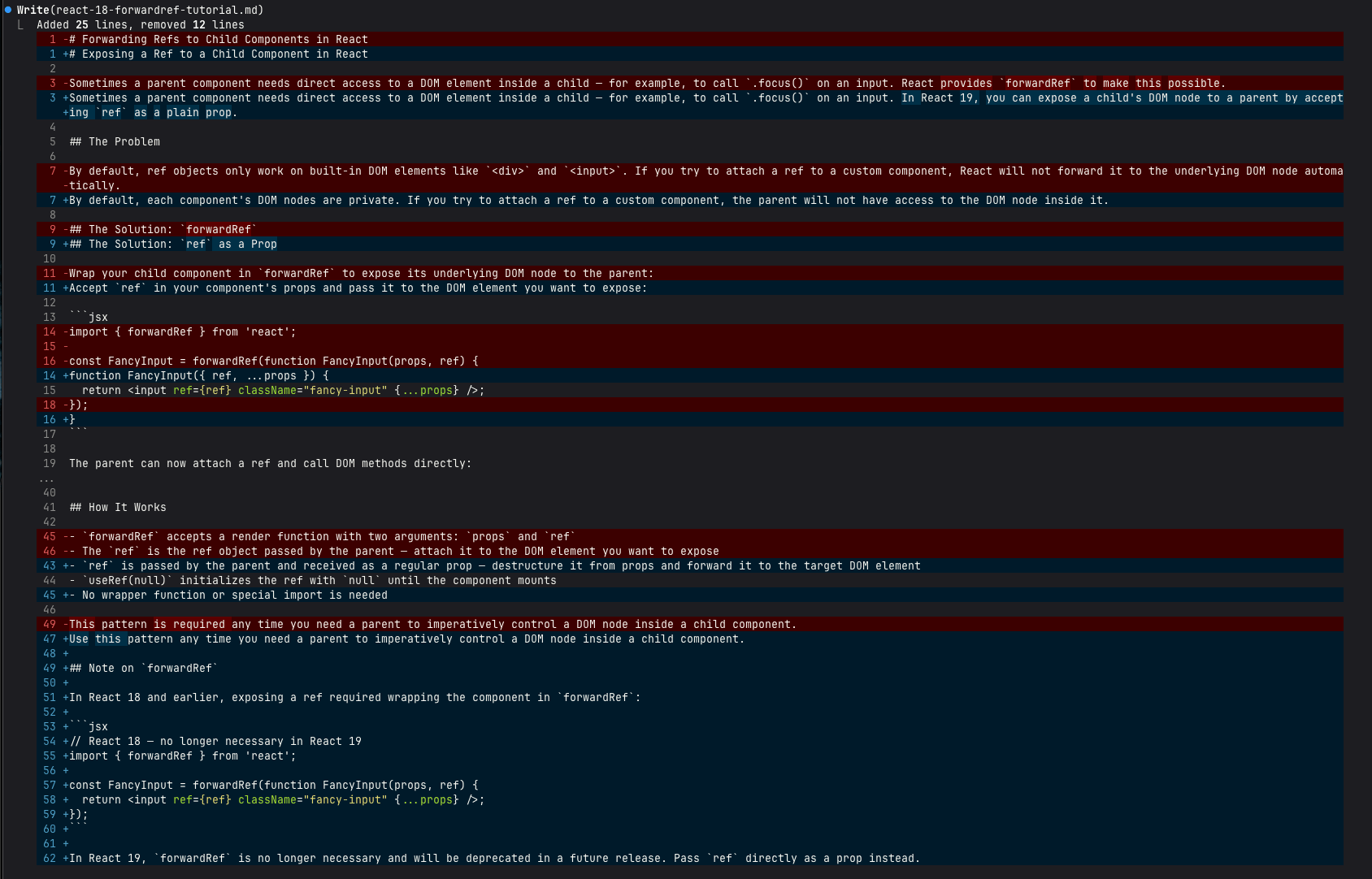
2
Verify the fix
Re-run the fact-check against React 19.2.0 to confirm the deprecation warning is gone:Claude shows the Claude gives a summary of all the findings again, and the forwardRef deprecation no longer appears:
forwardRef claim with a new citation from the React 19.2.0 docs that confirms the fix:Found an issue with this tutorial? Open a GitHub issue.